
Linked projects
A big effort can be several linked projects, each building on the one before: a first project that goes up and
merges on its own, then a second one whose commits sit on top of it. Each is an ordinary
project, with its own intro, stacks and review. The successor names the project it
builds on with after::
title: Calendar remindersafter: calendar-feed # the project this one builds on: its slug (directory name)repos: - path: ~/code/orchard-api # the same clone calendar-feed reviews branch: theo/calendar-reminders base: origin/mainThe link is one pointer, on the successor, like a branch’s parent in Graphite or git-town. A chain of them is a chain of projects; a project can have several successors.
The ranges
Section titled “The ranges”In a repo both projects have (the same path, or else the same repo name), the successor’s range starts where
the predecessor’s ends: its branch: (or to:), exclusive. That holds while that ref is an ancestor of the
successor’s branch, the normal state while both are in review: the successor’s branch sits on top of the
predecessor’s.
Once it isn’t, the range starts at merge-base(base, branch) as for any repo. That’s the state after the
predecessor has merged and the successor has been rebased onto the base: the predecessor’s branch is no longer below
it. So base: stays in the successor’s project.yaml the whole time; nothing needs editing when the predecessor
merges.
from:wins. A repo withfrom:starts there, link or not.- Only shared repos. A repo only the successor has is unaffected; the link is then just the order of the projects.
- Live. Moving the predecessor’s branch, or editing its range, moves the successor’s start, with no restart.
- One branch per project. Put the successor’s commits on their own branch on top of the predecessor’s, rather than
ending the predecessor with
to:on one branch: ato:sha moves with every rebase. Keep them aligned withgit rebase --update-refs.
When the link doesn’t hold
Section titled “When the link doesn’t hold”Local Review never drops or hides commits from a range; it warns, on the successor’s repo, and says what to do:
- The range includes the predecessor’s commits. The predecessor was squash-merged (so its commits never reach the base) and the successor hasn’t been rebased onto the base yet, and the predecessor’s branch is gone or moved. The range then runs from the merge-base with the base and takes in the predecessor’s PRs too. They’re recognised by sha (the predecessor’s prs files are named after its commits): rebase the successor onto the base.
- The predecessor’s branch is gone and none of its PRs have landed.
- A bad link:
after:names no project, the project itself, or makes a cycle (aafterbaftera). That’s a warning on the project, and the projects aren’t linked.
Publishing
Section titled “Publishing”local-review plan on the successor bases its first PR in a shared repo on the
predecessor’s top PR’s branch (base_from: predecessor), so the two go up as one stack on GitHub, and warns while
that PR isn’t published yet: publish the predecessor first. The predecessor’s own plan is unchanged. After the
predecessor has merged and the successor is rebased, the first PR goes onto the repo base again.
In the UI
Section titled “In the UI”-
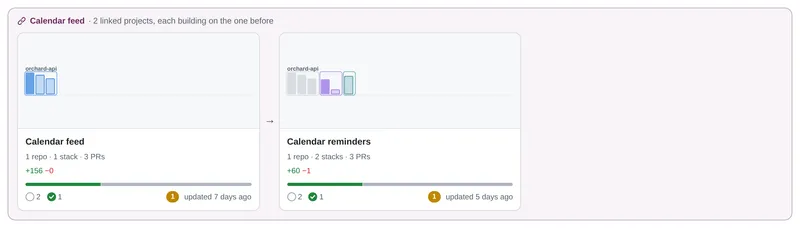
The root page shows linked projects together in one box spanning the row (“Calendar feed · 2 linked projects, each building on the one before”), their cards in order with arrows. A chain is in the Archived section only once all of it has merged. The successor’s thumbnail starts each shared repo’s lane with the predecessor’s stacks, in grey.
-
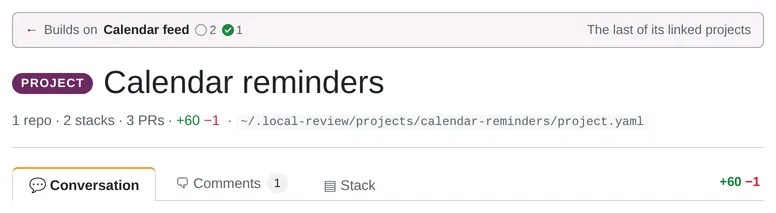
The project page has a bar above the title: ”← Builds on Calendar feed” with that project’s readiness, and “Next: …” on the predecessor.
-
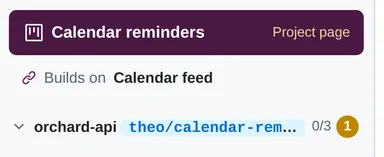
The sidebar links both ways under the project link (Builds on …, Next … →), and shows link warnings.
-
Breadcrumbs on PR and stack pages start with the predecessor.
-
The project switcher lists a successor right under its predecessor, indented.
-
PR and stack headers show the predecessor’s end as the base of the first PR.
-
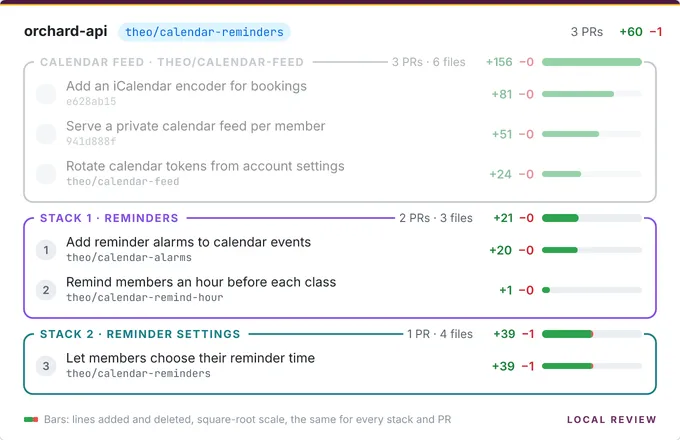
The stack picture can draw the predecessor’s stacks too: Show Calendar feed on the project page’s and a PR’s Stack tab (
?context=1in the image URL). They come first in each shared repo, greyed out, without PR numbers, and are left out of every total. It’s off by default, since the picture is what gets pasted into PRs.
Hidden projects
Section titled “Hidden projects”A project with hidden: true in its project.yaml is left off the root page
and the project switcher, but it stays linked: a successor’s range still starts where it ends, and its URL still
opens it. Where it was, the UI closes the chain over it:
- Last in the chain: the chain card shows the others. Its predecessor’s project page and sidebar leave out the “Next” link to it, and don’t call the predecessor the last of its linked projects either.
- In the middle (
a, then hiddenb, thenc): the chain card showsathenc, andcis labelled as building ona, the nearest project shown. Onc’s own page, ”← Builds on” still namesb, since that’s where its range starts. - First: the next project shown starts the chain card. A chain with a single project left is a plain card.
Remove the line (or set hidden: false) to bring it back; nothing else changed.
Splitting a project
Section titled “Splitting a project”To split an existing project into two linked ones: make one branch per project, create the new project with
after:, narrow the old one’s range, and move the review data of the commits that changed project with
local-review move: it copies their prs and reviews files into the new project
and renames the originals to .bak, deleting nothing. The agent guide has the
steps. The example projects include a linked pair: Calendar feed
and Calendar reminders.