
A tour of the UI
Local Review’s layout follows GitHub’s pull-request page closely, so it should feel familiar: a sidebar of PRs, and for each PR a header and Conversation, Files changed and Stack tabs. Under a header that is deliberately not GitHub’s.
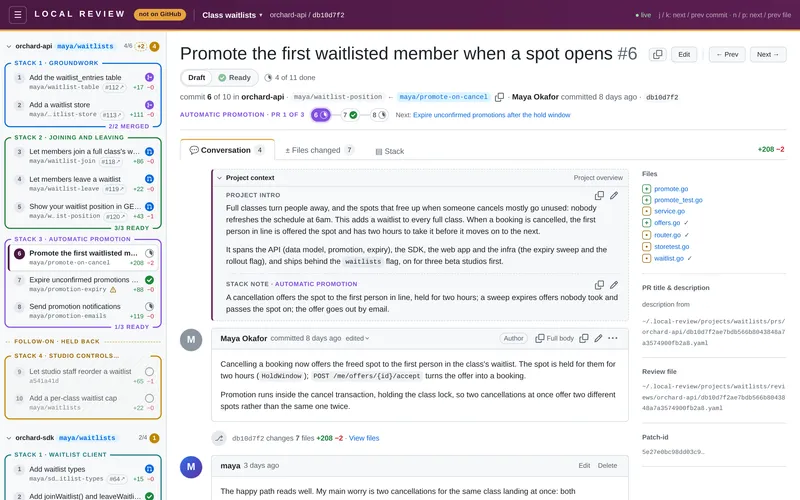
The header: deliberately not GitHub
Section titled “The header: deliberately not GitHub”The top bar is deep plum (#4a1942) with an amber underline. It carries a letter-spaced LOCAL REVIEW wordmark
and an amber “not on GitHub” pill, and selected tabs get an amber top edge. You can’t mistake it for github.com,
which matters when the rest of the page looks just like a PR you could merge.
The header also shows the project title, with a project switcher when there’s more than one project. Archived projects (everything landed) are in a collapsed Archived section at the bottom of the switcher. Click the project title to go to the project’s homepage.
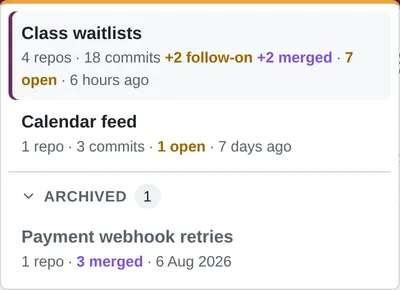
The sidebar
Section titled “The sidebar”- One collapsible section per repo, headed
repo · branch, with how many commits are fully viewed and how many threads are open. A repo with nothing live shows a purplemergedpill instead of its branch. - Each PR stack is a box with a coloured border and its title on the top line
(
STACK 1 · GROUNDWORK). Unstacked commits are grey and dashed. Follow-on stacks come last, yellow, under aFOLLOW-ON · HELD BACKdivider. - Each PR row has its number (“PR 2”; numbered 1..n across the repo, oldest first), its title, its
branch (middle-truncated; the short sha if none; a warning icon if the recorded branch moved,
struck through if it’s missing), a
#1234 ↗badge once the GitHub PR exists, +/− counts on the right, and one readiness badge, whose tooltip has the details. - A stack’s bottom border counts its ready PRs once there are any (
2/4 READY), and says4/4 MERGEDin purple once they’ve all merged. - Problems: a missing repo or branch shows an error card, a stack problem a warning.
The PR header
Section titled “The PR header”- The PR title with its position in the repo (
#3), and Edit beside it (see Editing PR titles & descriptions). - Where GitHub shows Open / Draft, a Draft | Ready toggle; or a blue Published pill with the
#1234 ↗link once a GitHub PR is recorded; or a purple Merged pill once it has landed, with “merged <when> (method)” in the line below. - The review progress (
6 of 15 done, with details in its tooltip). - “commit 3 of 10 in <repo>”, and a stepper of the PRs in this stack, in its colour
(
GROUNDWORK · PR 3 of 4), each with its readiness badge.
Toggling readiness, an agent’s edits to the prs file, and new Viewed marks or resolved threads update the sidebar, header and stepper live.
The tabs
Section titled “The tabs”- Conversation: the Project context box, the PR description, and the general and inline threads. At the bottom, the path of the review file it’s reading.
- Files changed: the diff, with a file tree, Split/Unified, and Viewed checkboxes. See Reviewing & comments.
- Stack: a picture of the project’s stacks with this PR highlighted. See Stack pictures.
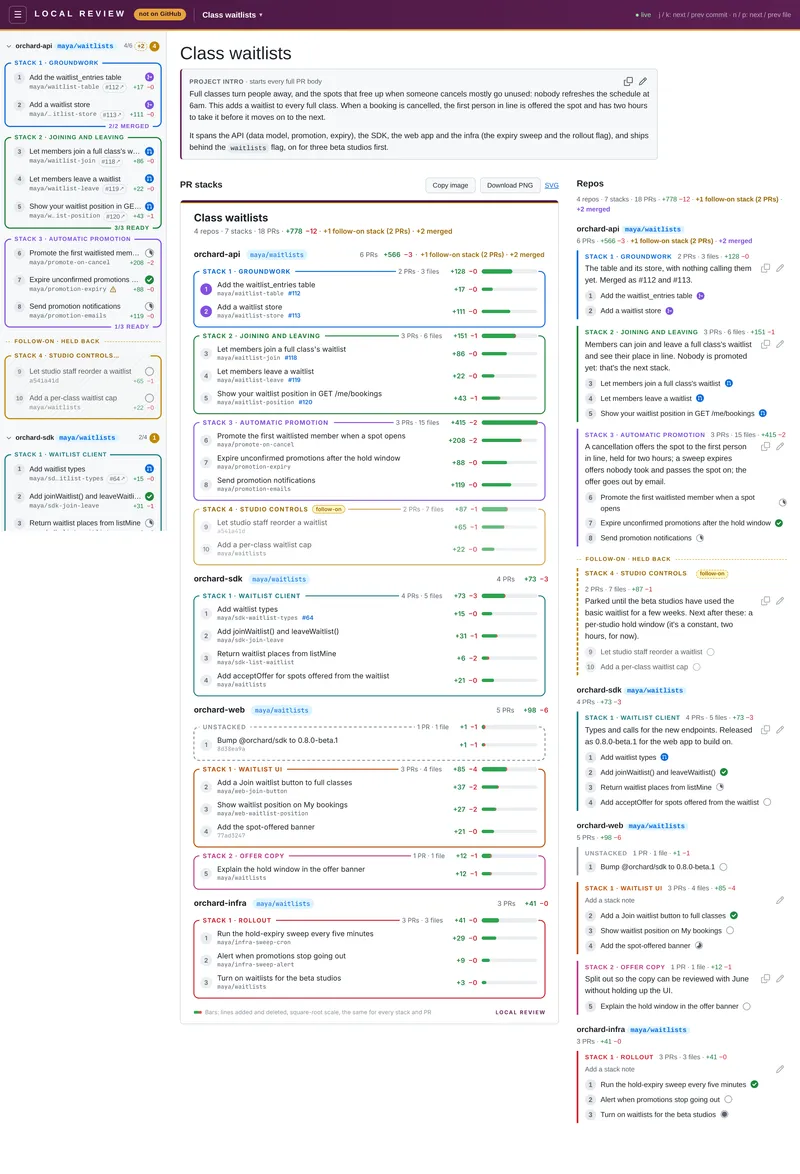
The project homepage
Section titled “The project homepage”/<project> (or click the project title in the header) shows:
- the project intro, editable in place;
- the stack picture for the whole project, nothing highlighted, with Copy / Download;
- a list of repos → stacks → PRs linking to each, with the project’s and each repo’s totals (follow-on stacks left out and mentioned, as in the picture), the same readiness badges as the sidebar, and for each stack its weight (PRs, distinct files, +/−) and its note (Edit, or “Add a stack note”).
| URL | |
|---|---|
/ | The most recently modified project’s first commit. |
/<project> | The project’s homepage. |
/<project>/<repo> | The repo’s first commit. |
/<project>/<repo>/<sha> | A PR (a short or full sha). |
…?tab=files / …?tab=stack | The Files changed or Stack tab. Add &file=<path> to jump to a file. |
Old /<repo>/<sha> URLs (from before projects) redirect into the project that has that repo.
Live updates and dark mode
Section titled “Live updates and dark mode”Everything updates live: branch heads are polled every 3 seconds and the data files are watched, so a new commit, an
agent’s reply or an edit to project.yaml shows up without a reload. Dark mode follows your OS setting.