
Readiness: draft, ready, published, merged
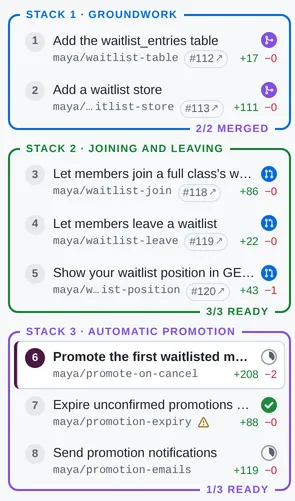
Every PR carries one readiness state. It starts as a draft while you review it, becomes ready when you mark it so, published once an agent records the GitHub PR it created, and merged once it has landed. A badge on every PR, and a count on every stack, show where things stand at a glance.
| State | Badge | Set by | Stored as |
|---|---|---|---|
| Draft | a small grey progress pie (a full pie at 100%: done, but not marked ready) | the default | no status: (or status: draft) |
| Ready | a white tick in a green circle | the reviewer, with the Draft | Ready toggle | status: ready |
| Published | GitHub’s PR icon in a blue circle | an agent, by recording the GitHub PR | a usable github: record |
| Merged | GitHub’s merge icon in a purple circle | an agent, by freezing the merged PR | a usable landed: record |
The rules
Section titled “The rules”- Draft and ready are stored in the PR’s prs file as
status:. Absent means draft; marking a PR draft again removes the key. - Published is derived: a PR is published as soon as it has a usable
github:record, whateverstatus:says. - Merged is derived from a usable
landed:record, and wins over the rest. Purple is kept for merged alone. - Marking a PR ready is the reviewer’s call. Agents don’t set
status: readyunless asked, and don’t clear it either.
Progress
Section titled “Progress”While a PR is a draft, its pie shows review progress: (resolved + viewed) / (threads + files), where threads are
conversations with at least one comment (outdated ones included), and files are the files changed, of which some are
marked Viewed. The badge’s tooltip has the details, e.g. “Draft · 6 of 15 done: 6/6 conversations resolved, 0/9 files
viewed”, and the PR header shows the same (6 of 15 done).
The API gives each commit status (draft, ready, published or merged) and
progress: {threads, resolved, files, viewed}.
Stacks
Section titled “Stacks”Once any PR in a stack is ready, the stack’s bottom border says how many are (2/4 READY; published and merged count as
ready), and 4/4 MERGED in purple once they’ve all merged.
Where you set it
Section titled “Where you set it”In the PR header, where GitHub shows Open / Draft, there’s a Draft | Ready toggle that writes status: to the prs
file. Once the PR is published it’s replaced by a blue Published pill with the #1234 ↗ link, and once it has
merged by a purple Merged pill, with “merged <when> (method)” in the line below. Toggling, an agent’s edits
to the prs file, and new Viewed marks or resolved threads all update the sidebar, header and stepper live.

Before publishing
Section titled “Before publishing”local-review plan warns about stacks that still contain draft PRs, and an agent asks before publishing one; only
the reviewer can clear that warning, by marking the PRs ready (or by telling the agent to go ahead anyway). See
Publishing as GitHub stacked PRs.