
Stack pictures
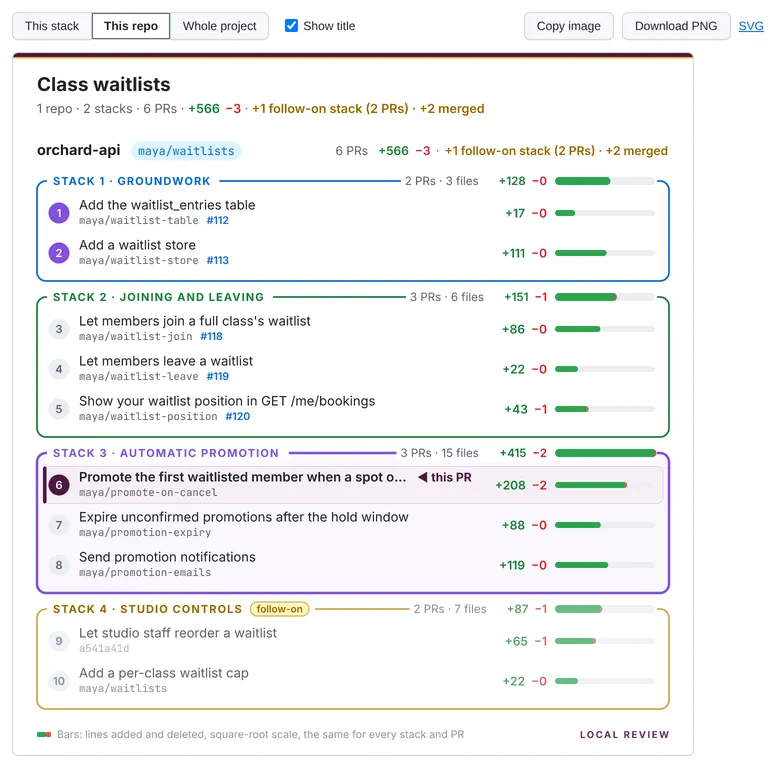
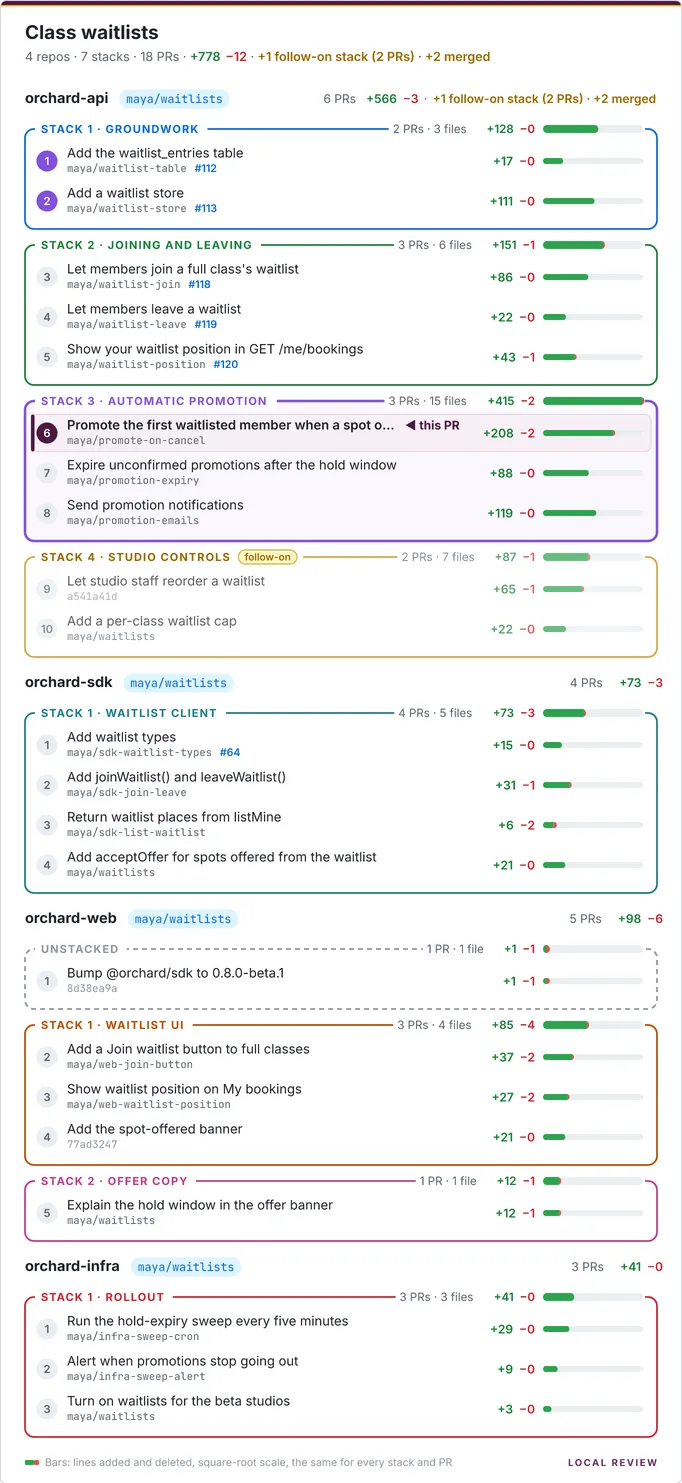
The Stack tab draws a picture of the project’s PR stacks, with the PR you’re on highlighted, and every PR’s size on one shared scale. Copy it as an image or download a PNG to paste beside a real PR, into Slack, or into a design doc. The project homepage shows the same picture for the whole project.
The Stack tab
Section titled “The Stack tab”Open it with the Stack tab on any PR (?tab=stack). It’s like the sidebar, but wider:
- This PR is highlighted: a tinted row, ◀ this PR, and its stack’s border emphasised.
- Weights. Each stack’s title shows its weight (PRs, distinct files, +/−), and every stack and PR has a green/red bar on one square-root scale shared by the whole image, so weights are comparable across stacks and repos.
- This stack / This repo / Whole project (default: This stack) picks what’s in the picture.
- Show title turns the project heading and summary line on or off.
- Both choices are remembered (in localStorage, for every PR and project).
- Copy image puts the PNG on the clipboard; Download PNG saves it.
Follow-on stacks are drawn faded, with a yellow follow-on tag, and the summary line
leaves them and merged PRs out of the totals and mentions them beside it
(2 repos · 4 stacks · 12 PRs · +3,300 −150 · +1 follow-on stack (2 PRs) · +9 merged). See
Totals.
On the project homepage
Section titled “On the project homepage”/<project> shows the picture for the whole project, with nothing highlighted, and the same Copy / Download.
As an image URL
Section titled “As an image URL”The pictures are served by the HTTP API, so a script or an agent can fetch one:
curl -o stack.png "http://localhost:5622/api/projects/my-feature/stack.png" # whole projectcurl -o pr3.png "http://localhost:5622/api/projects/my-feature/repos/my-service/commits/0a1b2c3d/stack.png?scope=stack"The SVG is 680px wide and the PNG is drawn at 2x (1360px). Options: ?scope=project|repo|stack,
?scale=sqrt|linear, ?title=0 and ?download.
How they’re drawn
Section titled “How they’re drawn”On the server, so the picture looks the same everywhere: server/stackviz.ts builds an SVG string (no DOM; text is
measured and truncated with the glyph advances of the bundled fonts, read with opentype.js), and
@resvg/resvg-js turns it into a PNG (prebuilt binaries, no browser). The fonts are
bundled in server/fonts/ (Inter and
JetBrains Mono, both SIL OFL 1.1), and resvg is given only those, so the
output is identical on every machine. Characters they lack (emoji, CJK) draw as boxes.